

By Olivia Dubois
·
August 29, 2026
An MCP proxy is a tool that acts as an intermediary between AI agents (such as Claude or Cursor) and MCP servers (APIs, business tools, and data). It brings several servers together behind a single access point, reducing integration complexity and improving IT management.
Main function: Centralise access to MCP servers through a single point.
Security: Manage authorisation (OAuth, JWT) and apply precise access controls.
Performance: Transform local requests into network formats and optimise responses through caching.
Compliance: Make it easier to meet regulations (GDPR, NIS2) through detailed logging and sensitive-data masking.
Observability: Track AI-to-server interactions in real time to detect errors and trends.
MCP proxies simplify the management of SaaS ecosystems by centralising connections, strengthening security, and providing better system monitoring, while reducing costs and processing time.
An MCP proxy plays a central role in managing interactions between agents and servers. Unlike conventional HTTP proxies, it can analyse JSON-RPC 2.0 payloads to identify specific operations, such as tools/list, tool/call, or access to prompts. This makes it possible to implement highly precise access-control lists (ACLs). For example, an agent may be allowed to view the list of available tools but require separate authorisation to execute certain tools.
These proxies rely on advanced authentication mechanisms such as OAuth 2.0, JWT, or Dynamic Client Registration (DCR). To strengthen security, some use temporary secrets, such as tokens valid for one hour, reducing the risk associated with long-term exposure of API keys.
“MCP servers no longer need to implement the authorisation specification themselves. They delegate authentication and consent management to the gateway.”
– Gravitee [2]
Traffic control is another important benefit. Proxies can limit the rate per user or MCP method and include vulnerability scanners. These scanners run automated tests on connected MCP servers to prevent AI agents from overloading backend systems or exploiting security flaws.
Beyond security, MCP proxies provide an overview of operations in real time. They allow teams to track exactly how agents use tools, analyse errors, and monitor the volume of generated traffic. For example, the AuthMCP gateway provides a live activity stream updated every 3 seconds [7].
This centralisation simplifies incident diagnosis. With correlation IDs included in request headers, IT teams can trace an action across different backend systems. Performance indicators such as latency, requests per minute, and success rate help identify failing tools or unreachable servers quickly. Some proxies also include caching mechanisms to reduce the load from repeated operations, such as retrieving the tool list.
“Operations teams see tool calls, failures, and attempts in real time, not after incidents.”
– Gravitee [2]
For companies subject to regulations such as the GDPR or the NIS2 Directive, an MCP proxy becomes an essential ally. It generates a complete audit trail for every action, whether a tool invocation, a data request, or an authentication event [6][9]. Some proxies can even automatically detect and mask personally identifiable information (PII) in calls or prompts, preventing leaks into unsecured environments.
Method-level access control applies the principle of least privilege: by default, an agent has read-only access, while more sensitive operations, such as writing or deleting, require explicit approval [8][9]. These proxies can also stop actions considered risky in real time, such as attempts to read configuration files (.env) or access SSH keys without authorisation.
With the European AI Act obligations entering into force on 2 August 2026, and penalties potentially reaching 7% of annual worldwide turnover, centralised governance becomes essential [9]. The figures speak for themselves: organisations with structured AI governance successfully deliver 80% of their AI projects, compared with only 37% for those without a formal strategy [9]. These key capabilities provide the foundation for understanding the benefits and limits of MCP proxies in IT management.
:::: @iframe https://www.youtube.com/embed/E1W1zsLd7AE :::
:::: @figure 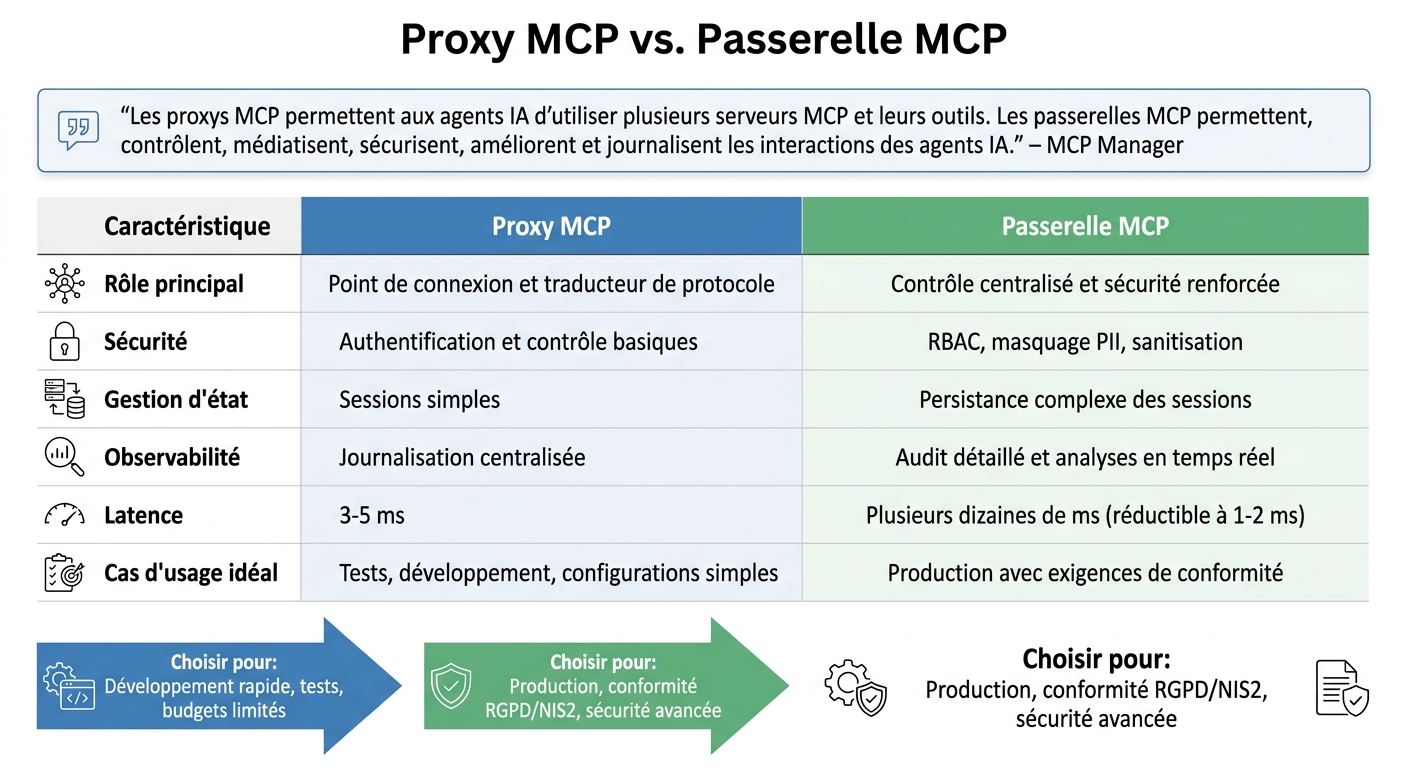 {MCP proxy vs MCP gateway: key differences and use cases}
:::
{MCP proxy vs MCP gateway: key differences and use cases}
:::
MCP proxies and gateways serve distinct functions in an IT infrastructure. An MCP proxy acts as a single entry point, grouping several MCP servers behind an HTTP interface. This makes client configuration easier and can, for example, transform local servers using the STDIO protocol into remotely accessible HTTP services [5][10].
By contrast, a gateway focuses on managing, securing, and optimising communications between AI agents and servers. It offers advanced capabilities such as personally identifiable information (PII) masking, prompt sanitisation, and detailed role-based access control (RBAC) [11][12].
“MCP proxies enable AI agents to utilise multiple MCP servers and their tools. MCP gateways enable, control, mediate, secure, improve, and log AI agents' interactions.”
– MCP Manager [12]
| Characteristic | MCP proxy | MCP gateway |
|---|---|---|
| Main role | Connection point and protocol translator [5] | Centralised control and enhanced security [11] |
| Security | Basic authentication and controls [5] | RBAC, PII masking, sanitisation [12] |
| State management | Simple sessions [5] | Complex session persistence [13] |
| Observability | Centralised logging [5] | Detailed auditing and real-time analysis [11] |
| Ideal use case | Testing, development, simple configurations [5] | Production with compliance requirements [12] |
In terms of performance, proxies add low latency (around 3 to 5 ms) [5]. Gateways, by contrast, can introduce latency of several dozen milliseconds when their security settings are enabled by default, although this can be reduced to 1–2 ms with specific tuning [13].
Now that their respective roles are clear, let us focus on the strengths of MCP proxies.
MCP proxies greatly simplify IT management by centralising connections. They allow teams to configure a single entry point for several MCP servers, removing the need to connect each AI agent individually. This reduces operational complexity and speeds up deployment [1][2].
These tools also delegate tasks such as authentication and consent management, making it easier to move from prototypes to production environments [2][4].
From an economic perspective, their rapid deployment makes them well suited to development environments, testing phases, or teams with limited budgets.
Finally, proxies provide centralised visibility into how AI agents use tools. Teams can monitor trends, detect failures, and identify behaviour in real time without querying every server individually [2].
Although these benefits make MCP proxies attractive, they also have limitations.
Despite their strengths, MCP proxies do not always meet advanced security requirements. For example, they generally do not provide capabilities such as personal-data masking, prompt sanitisation, or detailed access controls [12].
Secret management is another concern. Conversation logs with LLMs are not secure, and sharing long-lived API keys in these sessions exposes the organisation to significant risks. Although some proxies offer temporary keys, valid for one hour, this remains less secure than dedicated secret-management solutions [4].
Proxies can also overwhelm AI agents by exposing too many tools or complex instructions. Without effective filters, agents may be flooded with irrelevant options, increasing usage costs [2].
Finally, support for advanced MCP protocol capabilities can be inconsistent. While “Tools” are generally well supported, other capabilities such as “Resources”, “Prompts”, or “Instructions” may vary across AI clients, making standardisation more difficult in multi-tool environments [4].
After exploring their strengths and limitations, let us look at how MCP proxies fit into practical scenarios.
MCP proxies can restrict access to tools and servers by relying on the specifics of the MCP protocol. Unlike traditional HTTP proxies, which focus on URLs, MCP proxies handle precise methods such as tools/list, tool/call, or prompts/list [2].
This makes it possible to apply highly targeted access rules (ACLs). For example, a marketing team may view the available tools without being able to execute critical commands on sensitive databases [2]. In the background, the proxy checks parameters such as the token issuer, audience, and scopes through OAuth 2.1 to ensure that each request comes from an authorised user [14][15].
“When agents start taking actions, everything comes back to trust, auth, and scopes.”
– Akshay Parihar, Developer, Scalekit [18]
To counter so-called “Confused Deputy” attacks, where a server is unknowingly used to perform unauthorised actions, the proxy uses the OAuth On-Behalf-Of (OBO) mechanism. This system exchanges the user's token for another limited token, clearly identifying the proxy as an intermediary acting on the user's behalf [15]. These measures strengthen security while enabling other use cases.
An MCP proxy acts as a central platform for collecting events generated by AI agents and MCP servers. Every request receives a correlation ID, enabling precise tracking across several servers and sessions and eliminating blind spots in observability [16][5][6].
The proxy collects real-time metrics (response time, success rate, errors, and so on), helping teams spot problems quickly and maintain system performance [6][5][2].
Some advanced proxies can even compress JSON-RPC responses into CSV formats, reducing language-model (LLM) context-window consumption by up to 70%. In one case study, this saved between 25,000 and 30,000 tokens in a single interaction [17].
“The gateway manages session-level context and adds a Correlation ID/Trace ID to link those events that are part of the same event chain and span across different servers and sessions.”
– James Taylor, Senior Digital Marketing Manager, Visor [16]
Logs can then be integrated with tools such as Splunk or Datadog for in-depth audits [16][5].
Beyond access control, MCP proxies play a crucial role in meeting regulatory requirements such as the GDPR or NIS2. They centralise the application of security policies and can modify payloads to mask internal metadata or personally identifiable information (PII) before responses are sent to AI agents [2].
The proxy also inspects traffic, masks API keys and sensitive identifiers in logs, and detects attempted unauthorised access or policy violations [16][2].
Under NIS2, which imposes high standards for system resilience, proxies offer capabilities such as centralised logging and traffic control. These tools help prevent incidents and manage third-party SaaS integrations [2][4]. They also enable secure secret management: instead of sharing long-term API keys, the proxy can generate temporary tokens valid for only a few minutes, minimising the risk if a secret leaks [4][15].
“An MCP proxy must parse and interpret the MCP payload to determine which operation is being invoked and apply controls based on that context.”
– Prachi Jamdade, Developer Advocate, Gravitee [2]
MCP proxies help improve system performance through several techniques. Caching responses for frequent calls (such as tool metadata or repeated queries) reduces the load on backend APIs and speeds up responses [2][3].
They also manage throughput and automatically retry failed requests, ensuring service continuity without overload caused by unpredictable agent behaviour [2][3].
By providing instructions to LLMs only when needed (through methods such as getInstructions), proxies avoid filling the context window and reduce token consumption, lowering costs [4].
Despite the added latency of 3 to 5 ms, this overhead is largely offset by the benefits in security, governance, and operational efficiency. Connection pooling also ensures scalable throughput [5].
To make full use of the capabilities described above, here is a step-by-step guide to configuring your MCP proxy with Avanoo.
Before starting, make sure you have the necessary tools: Python 3.x or Node.js, Docker, and Docker Compose. You will also need a JWT secret key to sign authentication tokens, an OAuth 2.0/OIDC identity provider (such as Microsoft Entra ID or Logto), and an SQLite database to manage users and track security events.
Here are a few technical points to check:
Serve your proxies over HTTPS.
Allow the Authorization and Content-Type headers with CORS.
Store sensitive credentials (such as JWT_SECRET_KEY or ANTHROPIC_API_KEY) in a .env file.
On Linux, prefer file-based OAuth credential storage to avoid keychain-related errors.
Before the first start, run the commands needed to initialise the database (for example, authmcp-gateway init-db) to create the SQLite schema.
Once these steps are complete, move on to configuring authentication and access policies.
To configure OpenID Connect, define the issuer URL and Client ID. Make sure the proxy strictly verifies the issuer and audience claims in tokens. This ensures that the audience matches the identifier of the relevant MCP server, preventing tokens from being misused.
“The MCP server must verify that the token audience matches its own identity exactly... This is a key security lock to prevent token abuse.”
– Logto [14]
Next, use the Cedar policy language to define precise rules. For example:
Allow or deny specific actions (list_tools, call_tool) based on the user's identity, groups, or other attributes.
Define scopes for each integrated service, such as github:read or slack:messages:write, to apply the principle of least privilege.
Implement quotas and rate limits at the proxy level to protect backend resources.
Avanoo simplifies management by centralising access to your resources (GitHub, databases, and third-party APIs) through a single HTTP access point. This makes client configuration easier and provides a unified interface for your AI assistants.
For real-time data streaming, use modern methods such as Streamable HTTP or SSE. Also configure /.well-known/oauth-protected-resource to enable metadata discovery and inform clients about the available scopes. Enable CORS headers so web IDEs and other clients can access your registry.
“If instructions are not well supported, turn them into a tool. The LLM can call getInstructions on demand... This avoids injecting everything into the context.”
– Logto [4]
Use a tool such as getInstructions to load prompts or business logic only when needed, rather than injecting them into the context systematically. Also favour temporary tokens (valid for one hour) to limit production-secret exposure.
Monitoring plays a key role in management and security. Integrate tools such as Azure Monitor or Application Insights to track performance, and export logs to platforms such as Splunk or Datadog for detailed audits and proactive anomaly detection.
To optimise performance:
Cache frequent responses (such as tool metadata or repeated queries) to reduce the load on your backend APIs.
Track response times, success rates, and errors in real time to identify problems quickly.
Finally, Avanoo provides a real-time overview of how your SaaS applications are used. This helps detect unauthorised tools, identify unused licences, and reduce costs. With its automated compliance tools (GDPR, NIS2, and DORA), you get a centralised dashboard to manage resources while meeting regulatory requirements.
MCP proxies are more than a technical solution: they redefine how companies manage their SaaS ecosystem in the age of AI agents. By centralising key aspects such as security, compliance, and monitoring interactions between AI assistants and sensitive data, they address growing regulatory requirements (GDPR, NIS2, and DORA) while helping control operational costs.
The data is compelling: intelligent filtering can reduce token consumption by up to 91% [19], and protocol-level caching can significantly improve response times. In June 2025, more than 5,867 MCP servers were already active worldwide, and the market was estimated at US$10.4 billion [20]. These figures highlight how quickly the technology is gaining ground, with measurable benefits that make effective integration easier.
“If you cannot control how agents use tools, you do not control your system.” – Prachi Jamdade, Developer Advocate, Gravitee [2]
By building on this centralisation, solutions such as Avanoo provide real-time monitoring of SaaS application usage, identify Shadow IT practices, and support automated compliance. This approach not only simplifies day-to-day management, but also protects critical resources against threats such as unauthorised access or system overload through tools such as rate limiting and comprehensive logging.
Adopting an MCP proxy-based architecture lays the foundations for modern IT governance that combines security, efficiency, and compliance while preparing the organisation to make full use of autonomous AI agents.

Shadow AI Expert & Chief AI Officer
Olivia Dubois is Shadow AI Expert and Chief AI Officer at Avanoo. An HEC Paris graduate and former BCG consultant, she helps enterprises detect and govern Shadow AI and Shadow IT.
See how Avanoo can map your SaaS and AI landscape, reduce risk, and optimize costs. A reliable platform with dedicated human support.
