

By Olivia Dubois
·
July 4, 2026
I will get straight to the point: under the GDPR, I cannot keep personal data indefinitely, and in SaaS the main risk comes from scattered data.
In practice, a SaaS retention policy rests on a few simple rules:
Two figures show why this matters: the CNIL has already issued penalties for periods that were too long, including €100,000 for inactive accounts kept for too long and €1.75 million for data retained for decades.
Here is what to remember straight away:
I would sum up the article like this: first map the data, then classify it, set the periods, execute deletion in each tool, and finally keep a clean, dated evidence file.
This makes the policy easier to apply for legal, IT, and business teams.
Setting periods without a reliable map almost always leads to retention rules that are difficult to defend. The GDPR requires a clear link between each period, a specific purpose, and a documented legal basis. In plain terms, do not start with the period. Start by mapping the territory.
The first step is therefore to identify every data flow and link it to a clear category.
A useful inventory does not stop at the main applications. This is often where gaps appear. You also need to cover internal modules — for example, CRM forms — connectors and APIs between tools, regular exports such as PDF reports or analytics extracts, and secondary storage areas: backups, archives, and test environments.
For each identified flow, the inventory should specify:
This last point matters greatly. Some SaaS applications do not allow individual records to be deleted. It is better to discover this at this stage than after writing a policy that cannot be applied.
Once the inventory is in place, group the data into consistent categories: customer data, prospect data, employee and candidate data, authentication logs, support tickets, payment data, and archives.
Each category has its own requirements and retention periods. You also need to add the access profile and sensitivity level. In other words, two datasets may look similar on paper but require very different treatment. A technical log accessible only to system administrators is not managed like employee health data that several teams can access.
This combination — type, access, and sensitivity — helps address the most exposed categories first and adjust the related security measures.
Once these categories have been stabilized, you can set retention periods by data type.
The main risk comes from invisible flows. In a SaaS stack, they appear everywhere. Shadow IT, undeclared connectors, and forgotten exports: a single flow that has gone unnoticed is enough to distort the map.
SaaS governance platforms such as Avanoo help identify these undocumented flows. Without this visibility, retention periods are based on a partial view of the system. And a period based on a partial view soon becomes difficult to justify.
This map then provides the basis for setting defensible periods by category.
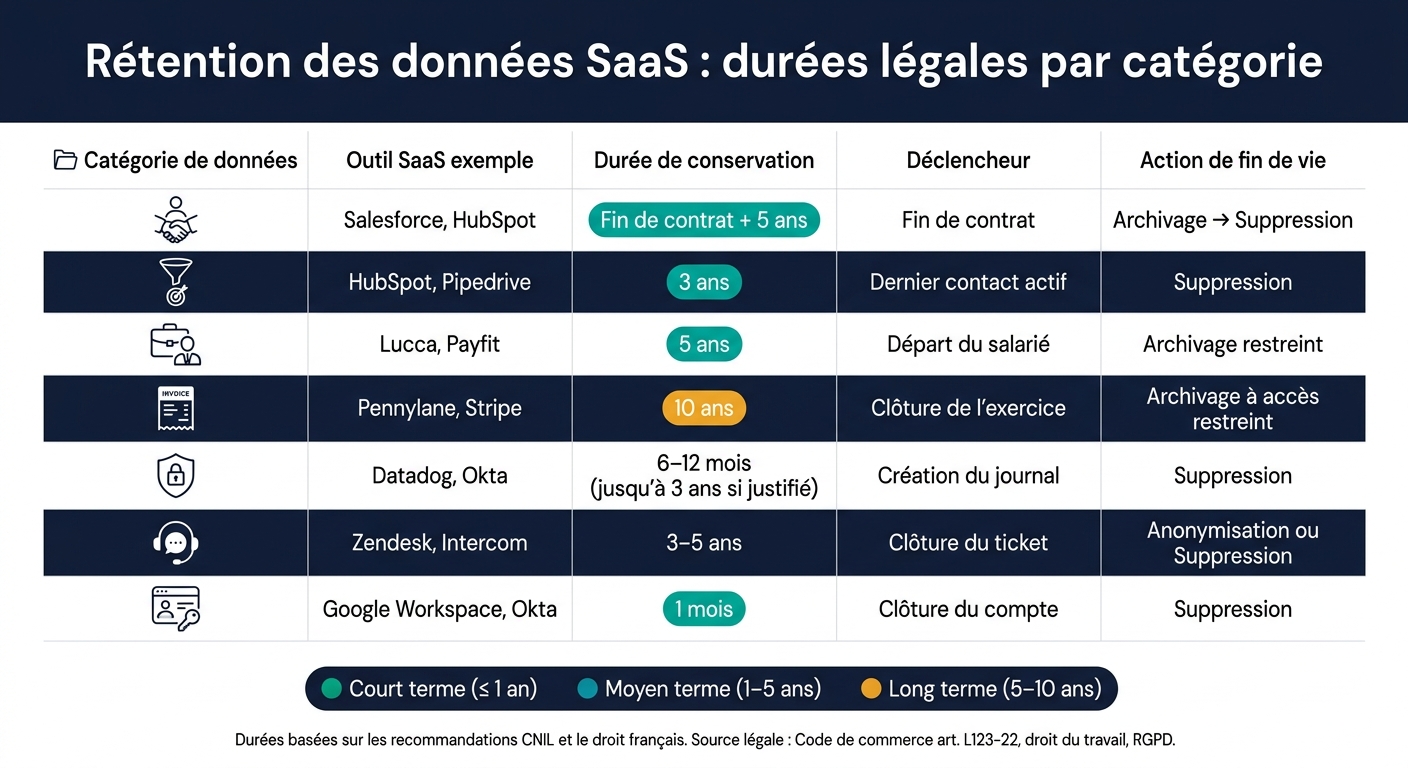
Based on the map, create a clear table, category by category, covering period, trigger, legal basis, and end-of-life action. Without this table, the policy is difficult to apply in the field and even harder to justify during an inspection. In practice, it provides a shared reference for configuring retention rules in each SaaS application.
A period does not start “roughly” from an unclear moment. It starts with a precise, dated, and verifiable event: contract end, last contact, ticket closure, or an employee's departure.
This point is often underestimated. A single SaaS application may contain several data categories with different uses. As a result, one tool may also have several retention rules. In a CRM, for example, customer data does not necessarily follow the same period as prospect data.
For each row in the table, link the category to one legal basis: contract, legal obligation, legitimate interest, consent, or legal claims. The idea is simple: one row, one primary basis.
Legal claims should remain limited to the actual need. They are not a convenient box to tick everywhere. If you apply this basis too broadly, your table loses clarity and your position becomes harder to defend.
Each row links data to a starting point and a final action.
Examples of rows to include in the table:
| Category | SaaS location | Period | Trigger | Legal basis / justification | End-of-life action |
|---|---|---|---|---|---|
| Customer data | Salesforce, HubSpot | Contract end + 5 years | Contract end | Contract performance / Legal claims | Archive then delete |
| Prospect data | HubSpot, Pipedrive | 3 years | Last active contact | Legitimate interest / Consent | Deletion |
| Employee files | Lucca, Payfit | 5 years | Employee departure | Legal obligation (employment law) | Restricted archiving |
| Invoices / accounting | Pennylane, Stripe | 10 years | Close of the accounting period | Legal obligation (Commercial Code, Article L123-22) | Restricted-access archiving |
| Security logs | Datadog, Okta | 6 to 12 months, up to 3 years if justified | Log creation | Legitimate interest (security) | Deletion |
| Support tickets | Zendesk, Intercom | 3 to 5 years | Ticket closure | Contract performance / Legal claims | Anonymization or deletion |
| User accounts | Google Workspace, Okta | 1 month | Account closure | Contract performance | Deletion |
These periods are based on CNIL reference points and French law: 3 years for commercial prospecting from the last active contact [4][7], 10 years for accounting documents [2][1], 5 years for certain HR files after departure [3], and 6 to 12 months for security logs, with a possible extension to 3 years depending on the context [5].
The next step is to define the most appropriate end-of-life action for each category: deletion, anonymization, or archiving.
When the retention period ends, the data must no longer remain in the active database. The lifecycle is simple on paper: active database, restricted archive, then deletion or anonymization. In a SaaS environment, however, this model must become separate rules for production, archives, and backups.
Each row in the retention table must lead to a clear exit action.
Secure deletion remains the default rule. If the data no longer has a legal or business purpose, remove it from production and then purge it according to the planned backup cycle.
Anonymization preserves statistical value without retaining personal data. If it is irreversible, the data falls outside the scope of the GDPR. Pseudonymization, by contrast, reduces risk but the data remains personal data.
Intermediate archiving, with restricted access, is justified only in specific cases: a legal obligation, legal defence during limitation periods, or regulatory oversight. This archive must remain separate from the active database, physically or logically, with limited access rights and access logging. It should contain only the data strictly necessary for the documented need.
In a SaaS environment, these rules must become automatable and auditable workflows. The table below summarizes the choice:
| Action | When to apply it | Effect under the GDPR |
|---|---|---|
| Secure deletion | End of retention, with no remaining purpose | Data is removed from production and purged from backups according to the planned cycle |
| Anonymization | Analytical or statistical retention is necessary | Data falls outside the scope of the GDPR if anonymization is irreversible |
| Pseudonymization | Reducing risk for active or archived data | Data remains personal; the GDPR continues to apply |
| Intermediate archiving | Documented legal obligation or litigation | The GDPR applies, with access strictly limited |
One point often goes unnoticed: backups. If data disappears from production but remains in backups, deletion is not effective. The retention policy must therefore set a separate backup retention period for each SaaS application — for example, 30 to 90 days for daily backups and 6 to 12 months for monthly backups [6][8] — and then check that these cycles remain aligned with the main retention rules.
Choosing the action is not enough. You also need to be able to execute it, tool by tool.
Deletion is not limited to a single click. It must cover production, exports, shared spaces, test environments, caches, indexes, and backups.
Operational workflows should include:
In the event of litigation or an audit, a legal hold mechanism must automatically suspend deletion and redirect the relevant data to the restricted archive. The scope and duration of the hold must be documented without ambiguity.
Traceability is mandatory. Every deletion, anonymization, or archiving action must be logged with the date, data category, tool used, and action taken. Platforms such as Avanoo help identify forgotten exports and uncontrolled environments, and verify that deletion rules are actually being applied. These logs then become part of the evidence file during an inspection.
Once deletions have been completed, the issue is no longer just execution. You must be able to prove it. Without centralized archiving, deletion logs are difficult to retrieve when an inspection happens. The GDPR accountability principle requires you to demonstrate compliance, not merely claim it [9][13].
In practical terms, build a structured, centralized, and easy-to-find evidence file. It should serve the CNIL, an internal audit, or a customer audit equally well.
The compliance file should bring together seven key pieces of evidence [9][11][13][16][18]:
| Item | What it must contain |
|---|---|
| Approved retention policy | Dated version, identified signatory, revision history |
| Retention table | Periods by category, trigger, legal basis, end-of-life action |
| Link to the record of processing activities (RoPA) | Correspondence between each retention rule and the relevant RoPA entry |
| Deletion and anonymization logs | Date, category, tool, scope (production, backups, and, where applicable, subprocessors), result |
| Archive access logs | Identity, timestamp, dataset accessed, purpose, action taken |
| Exceptions and legal-hold register | System concerned, reason, start date, planned duration, owner |
| Execution evidence | Deletion-job reports, API exports, before-and-after counts |
Every document must be versioned, dated, and linked to the relevant SaaS application and data category. This may seem administrative, but it is often what makes the difference during an inspection.
Audit logs may themselves contain personal data. They therefore need their own period: 30 to 90 days for operational logs and 12 to 24 months for security and audit logs [15][17][19].
To give logs greater evidential value, good practice recommends storing them write-once and separately from the main application database, with strict access rights [10][12][14]. In plain terms, if evidence is mixed in with everything else or can be modified too easily, it loses much of its value.
Platforms such as Avanoo can help centralize this evidence by SaaS application and make compliance reports easier to prepare.
The minimum documentation fits into five blocks. The idea is simple: know what is covered, why, for how long, and where the evidence is.
The policy must also remain aligned with supplier contracts — especially DPAs and SLAs — as well as with the applicable security requirements. Why? Because some deletions depend directly on what the SaaS provider does or does not allow.
An annual dry-run audit is often the safest way to check that the file stands up. It lets you verify that every piece of evidence is complete and that the legal, IT, and security aspects all line up [9][11][13].
::: faq
Start with a complete map of your application landscape. The goal is simple: identify every SaaS and AI tool in use, including those in Shadow IT.
Then classify each application according to its criticality and the type of data it processes. This work helps establish the right legal bases, align retention periods with GDPR, NIS2, or DORA, and document the policy in a centralized repository so you can justify it during an inspection. :::
::: faq
To define a GDPR-compliant retention period, the simplest approach is to align your retention policy with the legal obligations associated with each type of data processed in your SaaS applications.
In practice, it is not enough to set one “default” date for everything. Data does not all have the same status or retention period. Some data must be kept for a specific time. Other data must be deleted sooner.
You must also classify personal and sensitive data, then document the deletion and archiving rules in clear terms. This is what allows you to show, during an inspection, that your organization knows what to keep, for how long, and why.
Avanoo can help by continuously mapping your SaaS applications and making it easier to produce the evidence expected during an inspection. :::
::: faq
They create a significant GDPR compliance risk. Why? Because they may contain sensitive personal data while remaining outside your day-to-day oversight. You therefore need to include them in your data map.
Apply your retention rules to backups, archives, and logs as well. The idea is simple: set up automated deletion as soon as the legal period has expired. Avanoo helps identify unauthorized exports and check that these rules are actually being applied. :::

Shadow AI Expert & Chief AI Officer
Olivia Dubois is Shadow AI Expert and Chief AI Officer at Avanoo. An HEC Paris graduate and former BCG consultant, she helps enterprises detect and govern Shadow AI and Shadow IT.
See how Avanoo can map your SaaS and AI landscape, reduce risk, and optimize costs. A reliable platform with dedicated human support.
