

By Tanguy Duthion
·
June 6, 2026
If I had to sum up this article in one sentence: without nine SaaS reports, I do not have strong audit evidence.
In practical terms, I need to track three areas:
I also keep three simple reference points in mind:
Another strength of the article is that it is not theoretical. It lists the evidence to export, the fields to retain, the review frequencies, and the cases to monitor first, such as orphaned accounts, disabled MFA, or an unapproved application with 15 or more active users.
In short: if I want to avoid rebuilding my files at the last minute, I need a simple, dated, traceable cycle around nine reports.
Quick comparison:
| Framework | What I need to prove | Priority reports to produce |
|---|---|---|
| GDPR | Access to personal data, removal, data-subject requests | Account inventory, access review, logs + requests |
| NIS2 | Authentication, changes, incidents | Access logs, configuration history, incident register |
| DORA | SaaS dependencies, criticality level, continuity | Provider register, Shadow IT, licences + continuity |
The rest of the article therefore serves as a practical checklist: what to export, what to review, and what to archive so you are ready when an audit takes place.
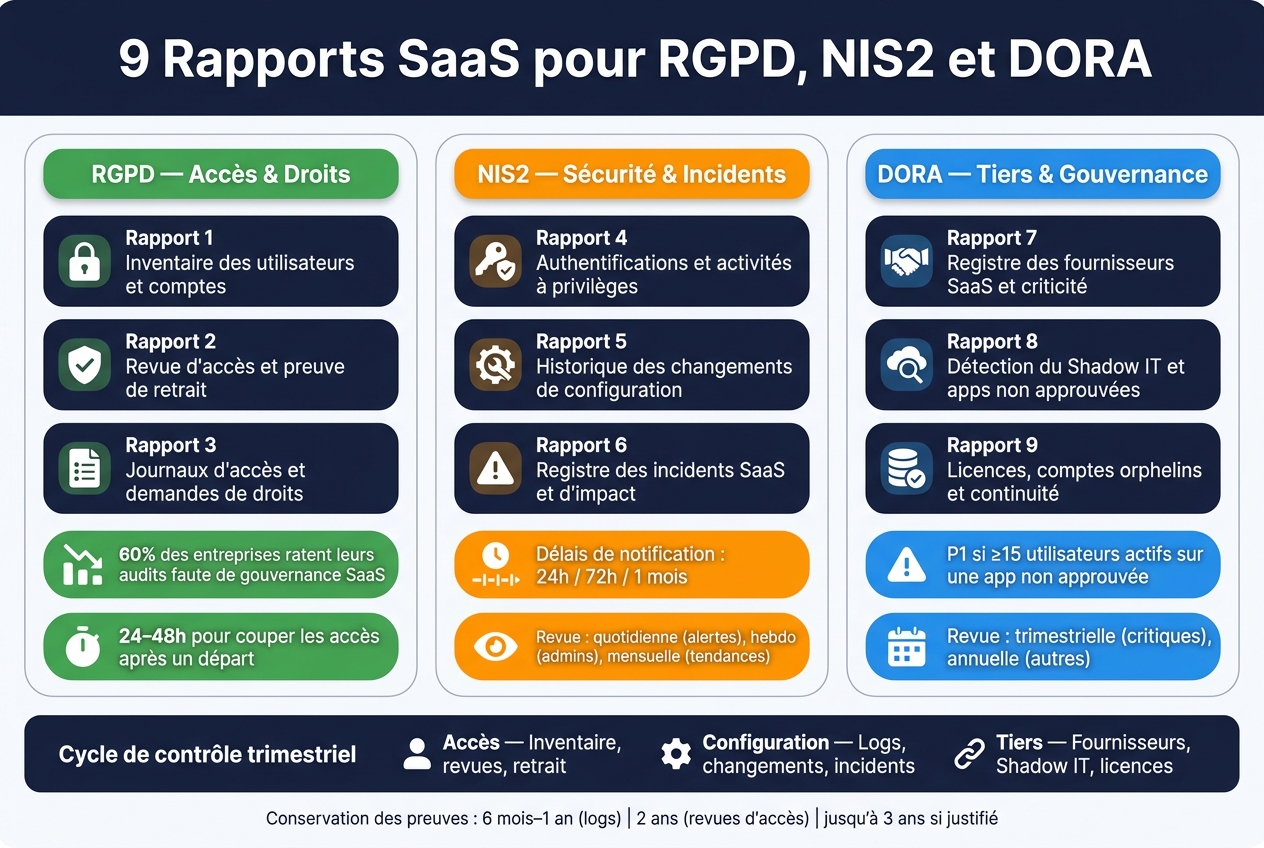
These are the first three GDPR reports to produce to prove access, review, and removal of permissions. They follow the GDPR's accountability principle: having a good policy is not enough. You must also be able to show clear technical evidence at any time.
This report answers a very direct question: who has access to what, and is there still a reason for that access? It should cover all SaaS tools that process personal data and include at least the fields below.
| Field | Expected detail |
|---|---|
| Identity | Name, unique identifier, business email |
| Organisation | Team, department, manager |
| Legal context | Legal entity |
| Application | Name, category (CRM, HR, documentation, etc.) |
| Access | Role, privilege level (administrator, user, billing administrator), licence type, authentication method |
| Lifecycle | Creation date, deactivation date, last login |
| Status | Active, inactive, disabled, leaving |
In practice, start by looking at dormant, orphaned, and shared accounts. Also connect HR departures with SaaS accounts within 24 to 48 hours. According to the available data, 60% of companies fail their audits because of weak SaaS governance [1].
This inventory is the starting point for every recertification.
An access review is of little use if it does not leave timestamped removal evidence. At every recertification cycle, record the access reviewed, the reviewer's decision - approval or removal -, the remediation action taken, the related ticket reference, and the closure date.
The difference between a report that is useful in an audit and a simple tracking spreadsheet is the traceability of remediation. If access is reduced rather than removed, the report must state the new role assigned and confirm that the remaining permissions have been approved.
Removal evidence can take several forms:
These elements must be retained for the period set by your internal policy. A common target is around two years to cover checks and audits. You should also store this evidence in a format protected against modification by the people concerned.
The third report connects technical evidence with data-subject rights requests.
This report brings together two related streams: activity logs and the tracking of data-subject rights requests.
Activity logs - fields to track:
| Field | Expected detail |
|---|---|
| Timestamp | Date and time of the event |
| Actor | User identifier |
| Operation type | View, export, modification, deletion |
| Data reference | Personal data concerned |
| Result | Success or failure |
The CNIL recommends logging at least creation, viewing, sharing, modification, and deletion actions, with a retention period between six months and one year, which can extend to three years if the purpose justifies it and the extension is documented [2].
Data-subject rights request tracking - fields to track:
| Field | Expected detail |
|---|---|
| Date received | Date the request arrived |
| Processing date | Date it was taken in hand |
| Closure date | Confirmed closing date |
| Owner | Data controller |
| Result | Action performed in the SaaS: deletion, anonymisation, or account deactivation |
Every erasure request must be traceable to the action taken in each relevant application. This chain is what makes the report usable during a review.
Avanoo can centralise this evidence and keep the inventory up to date.
These three reports track the access, configuration changes, and incidents required by NIS2. Together, they cover evidence, analysis, and response.
All timestamps must use the format DD/MM/YYYY HH:MM:SS, with the Europe/Paris time zone.
For each critical SaaS application, this report brings together all events linked to identity and privileged access. This includes successful or failed logins, MFA, role and privilege changes, account creation or deletion, and sensitive actions carried out by administrators.
Each event must contain:
Logs must be stored as read-only, with a retention period aligned with internal policy and sector recommendations.
The review follows a clear rhythm: automated alerts every day for anomalies, a weekly human review of administrator activity, and a monthly trend analysis. The priority cases are telling: a login outside normal hours, MFA being disabled on a critical SaaS application, or an administrator account created without an associated IT ticket.
Avanoo can centralise these events from several SaaS providers and IdPs in a unified view, simplifying the work of security teams.
These logs also help explain configuration gaps.
This report tracks all changes affecting the security posture of a SaaS application: MFA being disabled, a change of SSO provider, relaxed sharing rules, modified retention settings, or an update to role templates.
| Field | Expected detail |
|---|---|
| Application | SaaS name and category |
| Modified element | MFA, SSO, sharing, retention, roles, etc. |
| Previous / new value | Value before and after the change |
| Timestamp | DD/MM/YYYY HH:MM:SS format, Europe/Paris |
| Actor | Admin identifier, automation, or vendor update |
| Justification | Ticket reference, approval, risk assessment |
The aim is simple: compare each configuration with a baseline approved by the security team. If a gap appears, it must remain non-compliant until it has received formal approval. You must also track silent changes applied by the SaaS provider. This is often where problems begin: nothing is immediately obvious, but the security posture has already changed.
When an incident occurs, the register provides the facts and tracks the notifications.
This is the report that directly supports NIS2 notification obligations: early warning within 24 hours, detailed notification within 72 hours, and a final report within one month. To meet these deadlines, the register must be completed as soon as the incident is detected, not after the incident is over.
The minimum structure should include the unique incident identifier, its type - unavailability, account compromise, data leak, configuration error, provider outage -, the SaaS application or applications concerned, start and end dates and times, detection time, severity level, number of affected users or services, and any suspected or confirmed exposure of personal data. Internal, external, and regulatory notifications must also be recorded with a timestamp and reference.
The register must be populated at detection and linked to the ticketing system to automate escalation. A simple indicator to track during the monthly review is the incident containment rate. It is a good way to see whether the response works in the field, not just on paper.
After access, changes, and incidents, you still need to track providers, unapproved applications, and licences. This section covers third parties, Shadow IT, and licence management.
DORA requires a register of third-party SaaS providers, structured according to EBA fields. This is the foundation for identifying critical providers.
For each SaaS provider, the register should state the legal name, as well as the SIREN or SIRET number where applicable. It should also specify the business function covered, the categories of data processed - personal, sensitive, or financial -, hosting location, in France, the EU/EEA, or outside the EU, as well as contractors and subprocessors.
Also add security certifications such as ISO 27001, SOC 2, or HDS, along with the key contractual clauses. In practice, this includes RTO/RPO, incident notification deadlines, audit rights, and exit conditions.
The central point of the system is criticality classification. In most cases, a three-level grid is enough:
| Level | Main criteria | Implications |
|---|---|---|
| Critical | Supports a critical activity; a prolonged outage affects customers or regulators | In-depth due diligence, stronger contractual clauses, documented exit strategy |
| Important | Supports key processes with a manual fallback available | Periodic review, contractual SLAs, incident monitoring |
| Non-critical | Low-impact supporting tools | Minimal inventory, annual review |
The justification for the criticality level must be approved by Risk, Security, and Compliance. It must also be documented for each SaaS application, in black and white. Review providers after every major event, then follow a simple cadence: every quarter for critical providers, once a year for the others.
Good third-party governance also helps slow the arrival of unapproved applications.
Manual controls - surveys, occasional audits, and firewall logs - often miss web SaaS, free tools, and consumer AI services. The result is that data leaves the intended framework.
The report must list every detected application with, at a minimum, its business owner, status, number of active users, data category involved, access channel, hosting region, and risk level.
The status can take several forms:
Remediation priority is calculated by combining risk and volume. Any unapproved application with 15 or more active users must be treated as P1 priority. Conversely, an unapproved tool can be closed as soon as it falls to zero active users.
Avanoo automates this discovery by connecting to identity providers and expense systems, detecting new tools as soon as an employee signs up with a business identity, calculating a risk score, and mapping duplicates against tools already approved [1].
Once these uses have been identified, the same tracking helps deactivate dormant licences.
This report connects two topics that are often wrongly separated: costs and continuity. Track a few simple metrics: the number of licences purchased compared with the number used, the usage rate as a percentage, accounts inactive for 90 days, and orphaned accounts linked to paid licences - that is, accounts with no identified owner or attached to a former employee.
The financial impact should be presented in euros, using French usage data. Show the cost per user and per department. In other words, technical licence management must be connected to budget decisions, otherwise the report remains theoretical.
For critical providers, also add three points to the continuity review: spare licences, geo-redundancy, and premium support.
After this checklist, keep one simple rule in mind: every quarter, evidence must cover three specific areas - access, changes, and third parties. In total, nine reports cover these three dimensions.
| Area | Reports |
|---|---|
| Access | Inventory, reviews, removal |
| Configuration | Logs, changes, incidents |
| Third parties | Providers, Shadow IT, licences |
In an audit, what matters is not piling up files. The value comes from regularity. A dated quarterly report, with a clearly identified owner, recorded decisions, and proven closure, matches what auditors expect: a recurring control cycle, not a one-off data collection exercise.
To produce these reports without manual re-entry, a platform such as Avanoo centralises the evidence and makes the quarterly review easier.
The key point does not change: every quarter, you need to prove who accesses what, what changes, what is removed, and which third parties expose the risk.
::: faq
First prioritise the reports that show immediate risks and the governance status of your SaaS ecosystem.
Start with reports on active threats and high-risk discoveries, focusing especially on applications with the most active users. This is often where exposure is highest.
Then move to outstanding governance reports to identify unapproved or unrecorded applications. The goal is simple: regain control of Shadow IT before it becomes more established. :::
::: faq
Deadlines are strict for security incidents.
This is not simply an administrative exercise. When an incident occurs, the countdown starts almost immediately. And on critical systems, you also need to keep checking what happens in the field, not just what is written on paper. :::
::: faq
Keep a complete history of actions relating to your SaaS applications. Avanoo tracks the lifecycle of every access, from adoption through to deactivation.
During an audit or review, you can generate ready-to-use PDF or CSV reports. They serve as evidence that access was removed and your policies were applied, helping meet GDPR, NIS2, and DORA requirements. :::

Co-fondateur & CEO
Tanguy Duthion is co-founder and CEO of Avanoo. Previously at Google and Asana, he founded Avanoo to help organizations regain control over their SaaS and AI usage.
See how Avanoo can map your SaaS and AI landscape, reduce risk, and optimize costs. A reliable platform with dedicated human support.
